Website Redesign in Dubai: When to Refresh and When to Rebuild



Refresh your website when the structure still works and only the presentation has aged: same platform, same URLs, new visuals and sharper copy. Rebuild when the problem sits underneath: a platform that blocks what the business needs next, navigation that no longer makes sense, or conversions falling across the whole site. Evidence from your analytics decides which one you need, not the age of the design.
Many website redesign conversations in Dubai start with the same sentence: the site looks old. The more useful question comes next. Does "old" mean a dated colour palette and tired photography, or a platform, page structure and codebase that can no longer carry the business? Those are two different problems with two different fixes, and they carry very different costs and risks.
This guide separates the two. It covers the signs that point to a refresh, the signs that point to a rebuild, what to check before you brief anyone, how a redesign affects your Google rankings, and the UAE-specific layer (Arabic, English and accessibility) that can decide the scope. Every figure is linked to its original source.
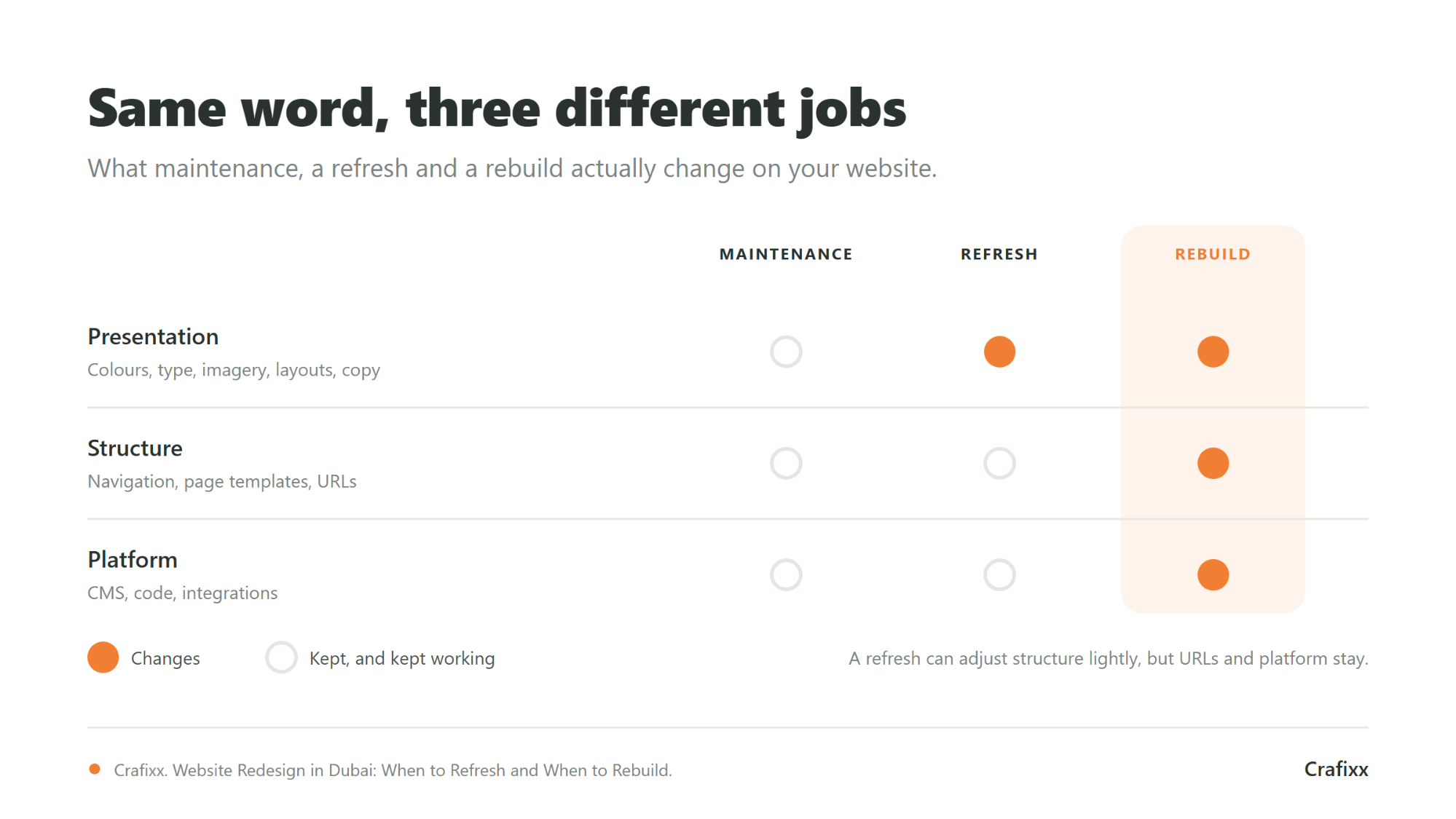
A refresh changes how your website looks and reads while keeping what it is built on. A rebuild changes what the website is: its platform, its content structure and often its URLs. Both get called a "redesign", which is how budgets end up spent on the wrong one.
A refresh updates the visual layer: colours, typography, imagery, page layouts, calls to action and copy. The content management system stays. The information architecture stays. The URLs stay. A refresh can be substantial, but it works inside the existing foundation.
A rebuild replaces the foundation: a new platform or CMS, a new content model, reworked navigation, new page templates and, in many cases, a new URL structure. A rebuild usually includes a visual refresh, but the look is the smallest part of the decision, not the reason for it.
There is also a third option people forget: ongoing fixes. Broken forms, slow images, outdated plugins and small content gaps are usually a job for regular website maintenance, not a redesign at all.
| Maintenance | Refresh | Rebuild | |
|---|---|---|---|
| What changes | Fixes, updates, small content edits | Visual design, layouts, copy, imagery | Platform, structure, templates, often URLs |
| Platform / CMS | Same | Same | Often new |
| URL structure | Same | Usually the same | Often changes |
| Navigation and page structure | Same | Mostly the same | Re-planned |
| SEO risk | Low | Lower, but changed templates and copy can still move rankings | Higher when URLs change, and needs a redirect plan |
| Typical trigger | Something is broken or out of date | The site works but looks or reads dated | The site cannot do what the business needs |
Looking dated is a symptom, not a diagnosis. Before committing budget, confirm that the design is actually costing you enquiries or sales. A site your team is tired of can still be doing its job well for customers, and replacing it without evidence risks losing what already works.
Nielsen Norman Group, the usability research firm, puts it plainly in its guidance on radical versus incremental redesign: "Don't let panic or boredom lead you astray." The same article reminds teams that they may be bored with their own site while customers are not, and recommends solid evidence before replacing anything. The article dates from 2015, but the principle has not aged: redesign decisions should rest on user data and clear goals.
That does not make appearance irrelevant. If your brand identity has changed, or the site now looks out of step with the quality of what you sell, a refresh is a legitimate business decision. The point is to name the actual problem first, so you pay for the fix that solves it.
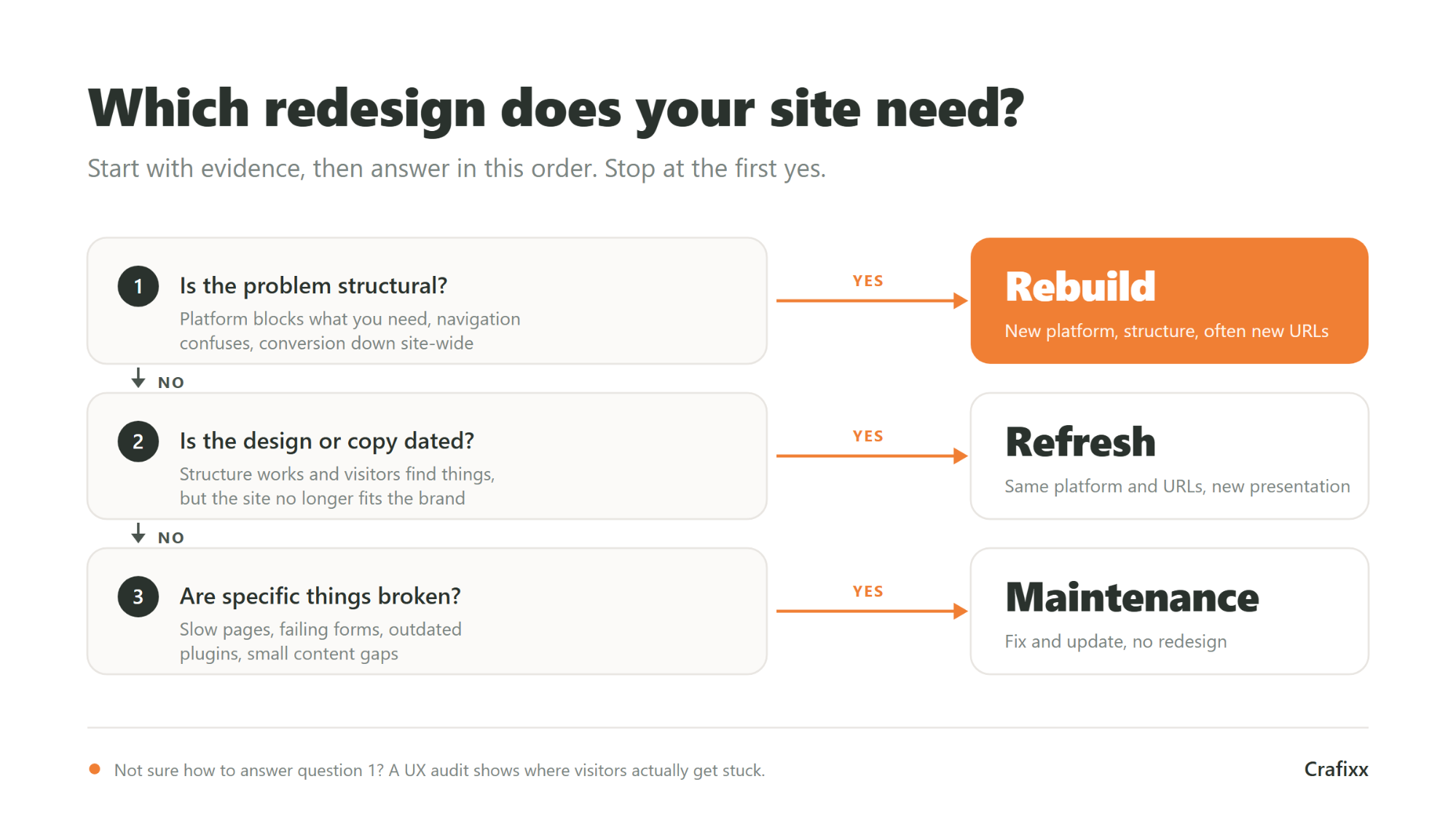
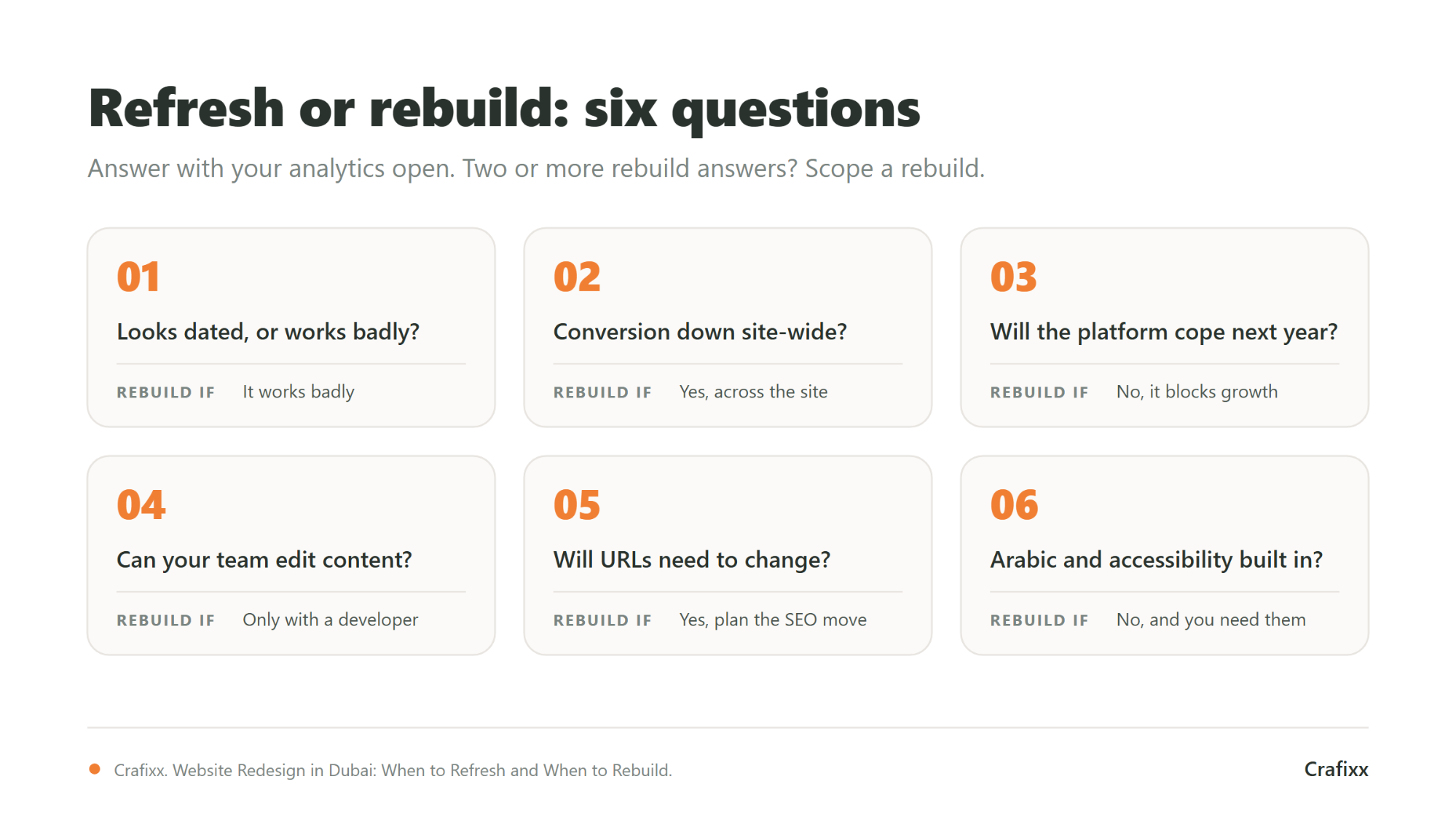
A rebuild is justified when the problem is structural: the platform, the page structure or the site-wide performance holds the business back, and smaller changes have stopped helping. If two or more of the signs below describe your site, a new coat of paint will not fix it.
A refresh is the right call when visitors can still find what they need, the platform does its job, and the issues are about presentation, messaging or brand. It keeps your URLs and structure intact, which makes it faster, cheaper and safer for search rankings than a rebuild.
If you are unsure whether the structure is really sound, that uncertainty is itself the answer to the next section: gather the evidence before anyone designs anything.
Answer six questions with real data before you scope a redesign: where visitors go, where they drop off, which pages bring search traffic, whether the site passes Core Web Vitals, whether your team can edit it, and where users get stuck. The answers show whether you are fixing presentation or structure.
| Question | Where to look | Points to a rebuild when |
|---|---|---|
| Are visitors reaching your key pages? | Google Analytics 4: landing pages and page paths | Important pages are hard to reach or rarely visited |
| Is conversion down everywhere, or on a few pages? | Google Analytics 4: key events by page | The drop is site-wide |
| Which pages bring search traffic? | Google Search Console: Performance report | Not a rebuild signal on its own; these pages must be protected in any redesign |
| Does the site pass Core Web Vitals? | PageSpeed Insights, Search Console Core Web Vitals report | Pages fail across templates, not on a single page |
| Can your team edit content easily? | Ask the people who update the site | Routine changes need a developer |
| Where do users get stuck? | Usability testing or a UX audit | Problems trace back to navigation and structure |
Google's Web Vitals guidance sets the "good" thresholds: Largest Contentful Paint within 2.5 seconds, Interaction to Next Paint of 200 milliseconds or less, and Cumulative Layout Shift of 0.1 or less, measured at the 75th percentile of page loads.
For the last question, a structured UX audit costs far less than a redesign and is a sensible first step. It tells you which screens and flows are losing people, so the redesign brief targets real problems rather than opinions.
Yes. Any significant change can move rankings, and a rebuild that changes URLs is the highest-risk version. Google says fluctuation during a site move is normal and settles over time, provided every old URL permanently redirects to its new equivalent. A refresh that keeps the same URLs avoids most of this risk.
Google's guidance on site moves with URL changes is specific. It states that "you may experience ranking fluctuations while Google recrawls and reindexes your site". It recommends server-side permanent redirects, such as 301 or 308, from each old URL to its new one, and advises against redirect chains. It also says to keep the redirects "generally at least 1 year", so Google can transfer signals to the new URLs. For medium-sized sites, Google notes it can take a few weeks or more before the new URLs replace the old ones in search results, and longer for larger sites.
Before a rebuild with new URLs goes live, make sure these are covered:
None of this is a reason to avoid a rebuild that genuinely needs new URLs. It is a reason to budget for redirect mapping and post-launch monitoring from day one, ideally with an SEO specialist involved before the sitemap is final. A rebuild is also the natural moment to structure content so it is easier for AI search tools to quote, which our guide to SEO vs GEO explains.
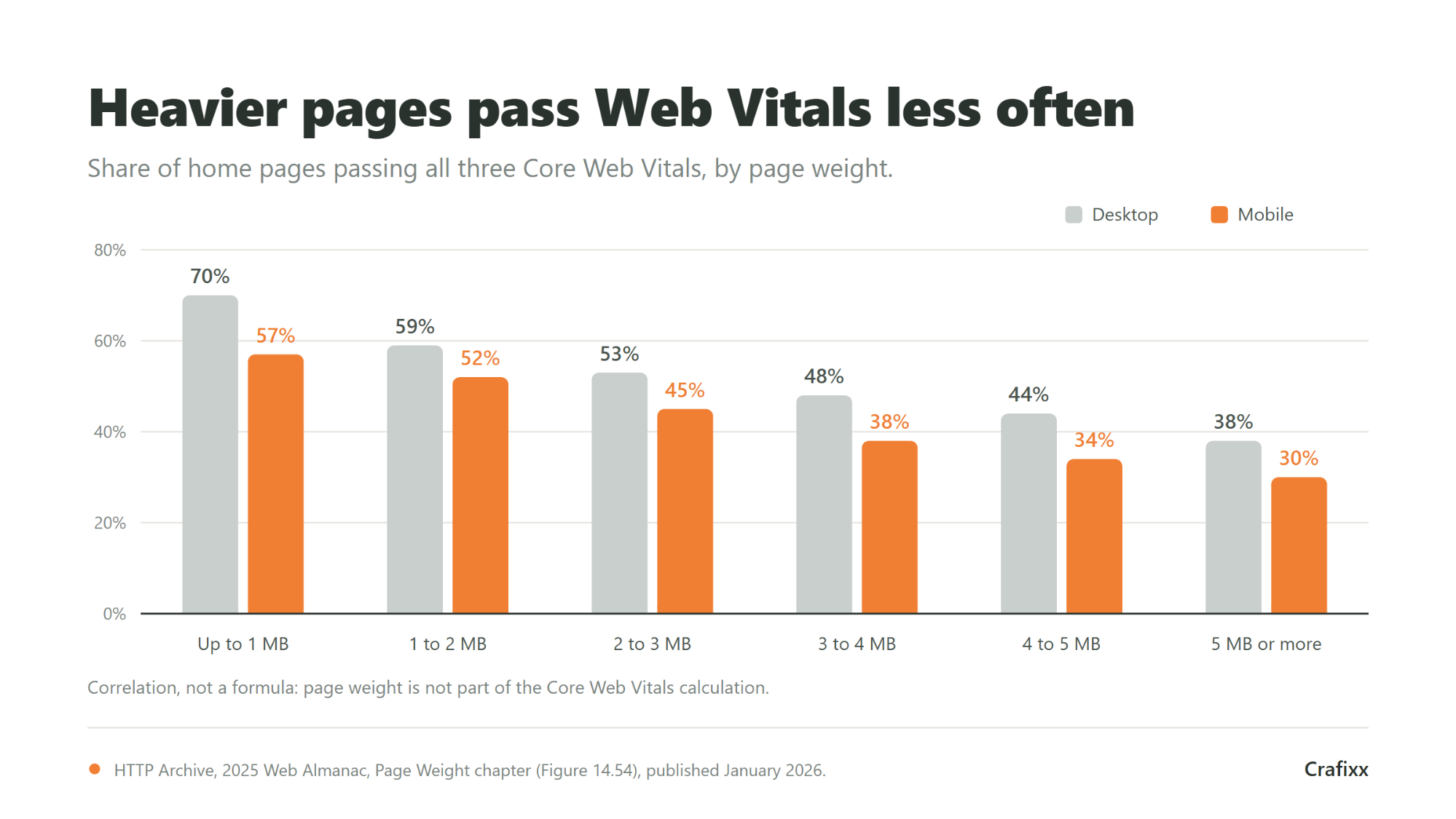
Speed problems that come from heavy templates, oversized media and accumulated scripts are hard to solve with a refresh, because the refresh keeps the code underneath. A rebuild resets that foundation. The data shows why it matters: heavier pages pass Core Web Vitals far less often.
The HTTP Archive 2025 Web Almanac measured home pages against all three Core Web Vitals by page weight. Among home pages up to 1 MB, 70 percent on desktop and 57 percent on mobile passed. Among pages of 5 MB or more, only 38 percent on desktop and 30 percent on mobile passed. The Almanac notes that page weight is not part of how Core Web Vitals are calculated, but the data shows a clear correlation.
Device mix matters too. StatCounter recorded UAE web traffic in August 2026 at 52.62 percent mobile, 46.8 percent desktop and 0.59 percent tablet. With traffic split almost evenly, a redesign reviewed only on a laptop screen misses half the audience. Responsive web design should be specified and tested on both from the first wireframe.
In the UAE, a rebuild often has to support two languages, two reading directions and a written accessibility standard. These are structural requirements. Retrofitting them onto an existing site is difficult, which is why bilingual support and accessibility can tip the decision from refresh to rebuild.
Arabic reads right to left, so a true Arabic version mirrors navigation, layouts, icons and form flows rather than translating text into an English layout. If your current platform cannot handle this cleanly, that alone can justify a rebuild. Our guide to multilingual websites for Arabic and English covers the structural choices, and Arabic SEO in the UAE covers how the Arabic pages get found.
The UAE Design System references the Web Content Accessibility Guidelines (WCAG) 2.1 and instructs federal government entities to comply at AA level. The W3C has since published WCAG 2.2, which first became a W3C Recommendation on 5 October 2023.
The UAE's National Digital Accessibility Policy covers the accessibility of UAE government digital services. Its scope names federal entities and also semi-governmental entities, private companies, partners, contractors and sub-contractors involved in providing those digital services. If your business builds or runs digital services for a government entity, confirm the requirements with that entity before the rebuild is scoped.
Even where no rule applies, accessible forms, clear focus states and readable contrast make a site easier for every visitor to use. A refresh rarely reaches these components. A rebuild replaces them, so specify accessibility at the start, alongside the UI/UX design, rather than adding it after launch.
Scope drives cost far more than visual style. The main variables are how much content has to move, how many distinct page templates the site needs, which systems it connects to, how many languages it supports, and whether the URL structure changes. A refresh touches few of these. A rebuild touches all of them.
| Cost driver | Why it matters |
|---|---|
| Content volume | Every page must be migrated, rewritten or retired, and someone has to decide which. |
| Number of page templates | Each distinct layout (service, product, article, landing page) is designed, built and tested separately. |
| Integrations | CRM, payments, booking, ERP and marketing tools each add build and testing work. |
| Languages | An Arabic version adds translation, right-to-left layouts and a second round of testing. |
| URL changes | Adds redirect mapping, SEO checks and post-launch monitoring. |
| Custom functionality | Features beyond what a template or CMS offers are designed and built from scratch. |
There is no published, UAE-specific benchmark for redesign pricing that we can verify, so treat any confident AED range you see online with caution. The closest neutral data comes from Clutch, the B2B review platform, whose September 2026 web design pricing guide reports that most web design projects reviewed on the platform cost under USD 10,000, while the average across reviewed projects is USD 38,105. Clutch puts the most common hourly rate for the web design companies shortlisted on it at USD 100 to 149.
The gap between those two numbers is the useful part. A small number of large projects pull the average far above what a typical project costs, which is why an average is a poor basis for a budget. At the Central Bank of the UAE rate of AED 3.6725 to the US dollar, USD 10,000 is roughly AED 36,700 and USD 38,105 is roughly AED 140,000.
Three caveats before you use those figures. Clutch data is global, not UAE-only. It covers web design projects in general, not redesigns specifically. And it reflects projects that clients chose to review on a platform, not the whole market. Use it to sense-check a quote, not to set a budget.
When you compare quotes, ask each agency to list these items separately. Two quotes for "a redesign" can describe completely different projects, and a single lump sum hides which one you are buying. If you are weighing a template against a bespoke build, our breakdown of template vs custom websites shows where the long-term costs sit.
Work through these six questions with your analytics open. If most answers point to presentation, plan a refresh. If two or more point to the platform, structure or URLs, you are scoping a rebuild and should budget and plan for it as one.
We use cookies to help you navigate efficiently and perform certain functions. You will find detailed information about all cookies under each consent category below.
The cookies that are categorised as "Necessary" are stored on your browser as they are essential for enabling the basic functionalities of the site.
We also use third-party cookies that help us analyse how you use this website, store your preferences, and provide the content and advertisements that are relevant to you. These cookies will only be stored in your browser with your prior consent.
You can choose to enable or disable some or all of these cookies but disabling some of them may affect your browsing experience.

for opt the service.
Our represntative will join this meeting on given time.