How to Set Up a Shopify Store in the UAE: Licence, VAT, Payments and Shipping



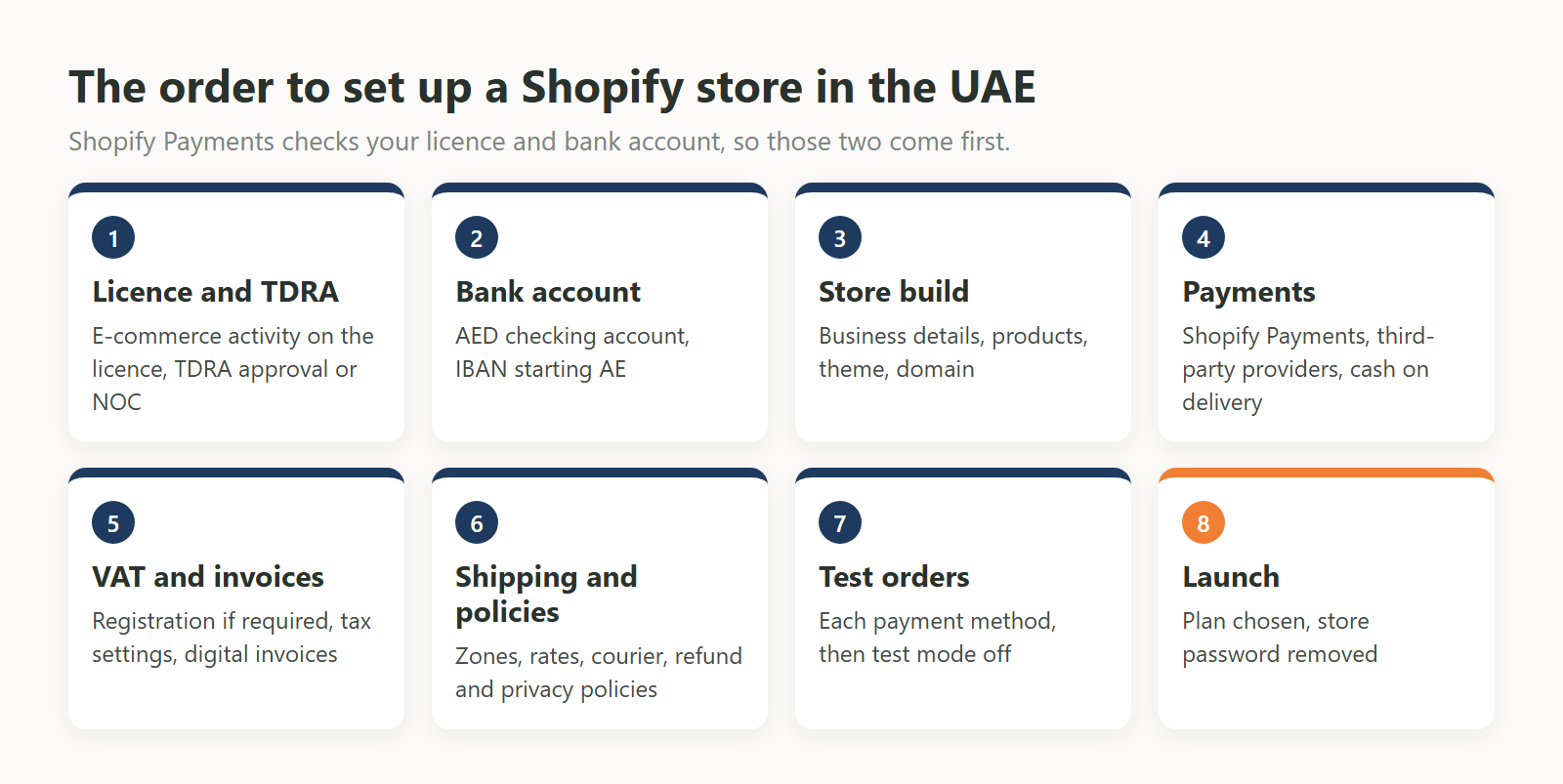
Shopify works in the UAE. Before you sell, get a licence that covers e-commerce, with TDRA approval, and open a bank account that suits the payment route you want. Then build the store, connect payments, set up VAT and shipping, and place test orders before you remove the store password.

Most of this work happens outside Shopify, and the order matters. Shopify Payments checks your licence, your company registration number and your bank account, so a store built before those are ready can sit finished but unable to take cards through Shopify Payments. We read the official pages for each step on 2 and 4 November 2026 and link to them below, because these rules change. The Shopify Payments plan limit changed in August 2026, for example.
In this guide:
Yes on both counts. Shopify accepts UAE businesses and publishes UAE pricing. The legal question sits with the seller: the UAE regulates online selling through Federal Decree by Law No. 14 of 2023, which covers goods, services and data sold online, including through social media. It applies whichever platform you use.
Shopify itself lets you open a store without a licence. Its own guidance on business licences says it does not require one to open a store, and that government rules may still require one based on what and where you sell. In the UAE they do. The government portal says anyone selling online must obtain the required licences and approvals, so you can build and test the store first, but you need the licence before you take real orders.
The licence depends on where your company is set up and who you sell to. A mainland company needs a commercial licence with e-commerce activity from its emirate's economic department. A free zone company gets its licence from the free zone authority. A home-based seller in Dubai can look at the E-Trader licence. All of them need TDRA approval.
| Route | Issued by | What it allows | Limit to check | Shopify Payments business type |
|---|---|---|---|---|
| Mainland commercial licence with e-commerce activity | The emirate's Department of Economic Development (DED), such as the Abu Dhabi Department of Economic Development or Dubai's Department of Economy and Tourism (DET) | Selling online on the UAE mainland | Some emirates issue a separate individual e-commerce licence, others add the activity to a regular commercial licence | LLC or Sole Establishment |
| Free zone licence | The free zone authority | Operating inside the free zone and internationally | Selling directly on the mainland may need a local distributor or additional approvals | Free Zone LLC or Free Zone Sole Establishment |
| E-Trader licence (Dubai) | Dubai DET | Home-based selling through social media and online platforms | Sole proprietorship only, and the owner carries full legal responsibility | Sole Establishment, if the licence shows a registration number |
The first two rows come from the UAE government portal and the third from the Dubai government portal. The last column follows Shopify's UAE requirements page. Before you apply, check that the activity on the licence matches what you will sell. Products that need approval from another authority cannot be sold until that approval is in place.
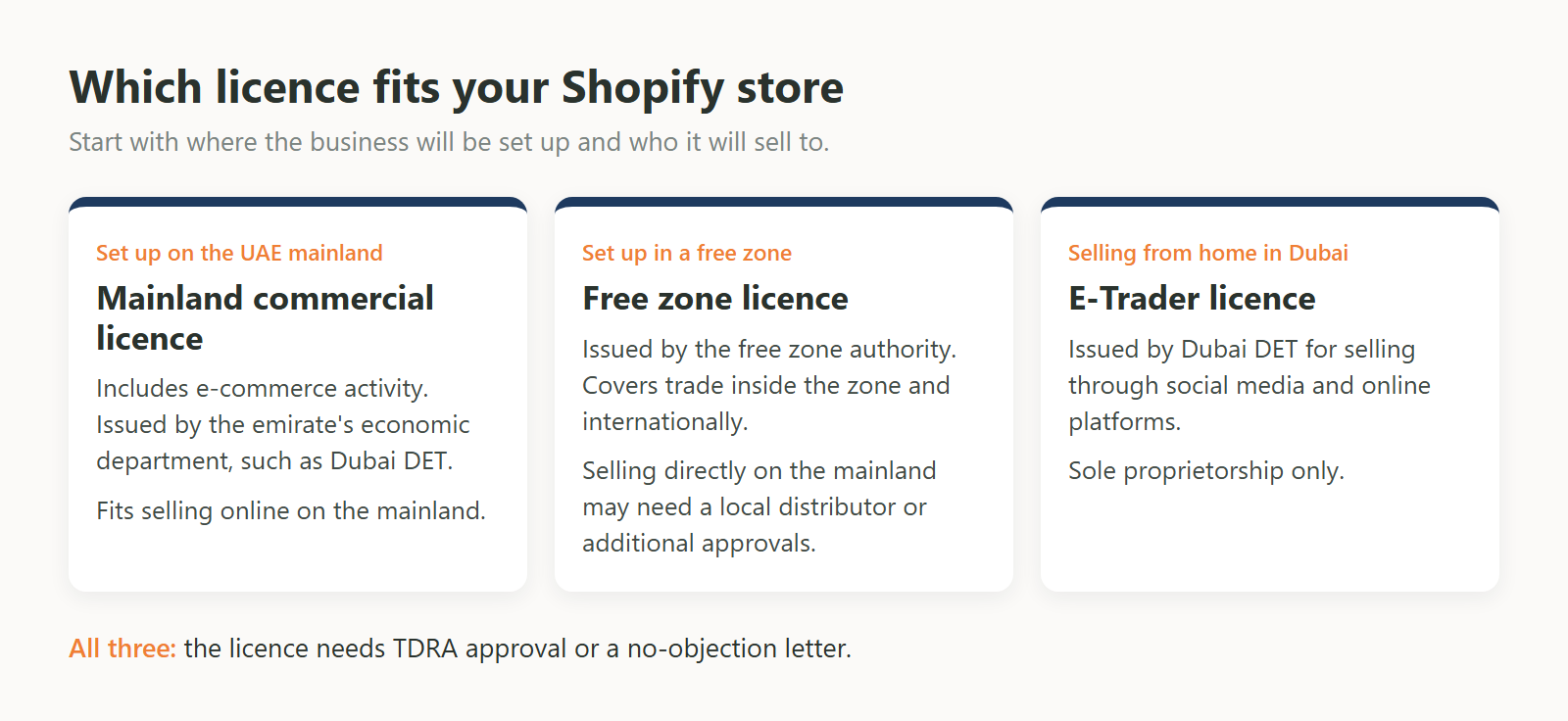
The Telecommunications and Digital Government Regulatory Authority (TDRA) regulates e-commerce in the UAE, and the portal says all e-commerce licences need its approval. Dubai's portal describes this as an approval or a no-objection certificate (NOC). Ask your licensing authority how the approval or NOC is handled for your licence, and keep a copy with your trade licence.
The UAE portal lists duties that affect how the store is built, so treat these as part of your setup:
Create the account at shopify.com, then work through business details, products, theme and domain in that order. You can do all of this during the free trial with the store still password protected. Shopify's setup guide covers the screens, so the steps below focus on the choices that matter for a UAE store.
You have three routes: Shopify Payments if your plan and business qualify, third-party providers such as Tabby, Tamara and Telr, and manual methods such as cash on delivery. You can combine them. Start by confirming whether Shopify Payments is open to you, because that decides whether you need a third-party provider for card payments.
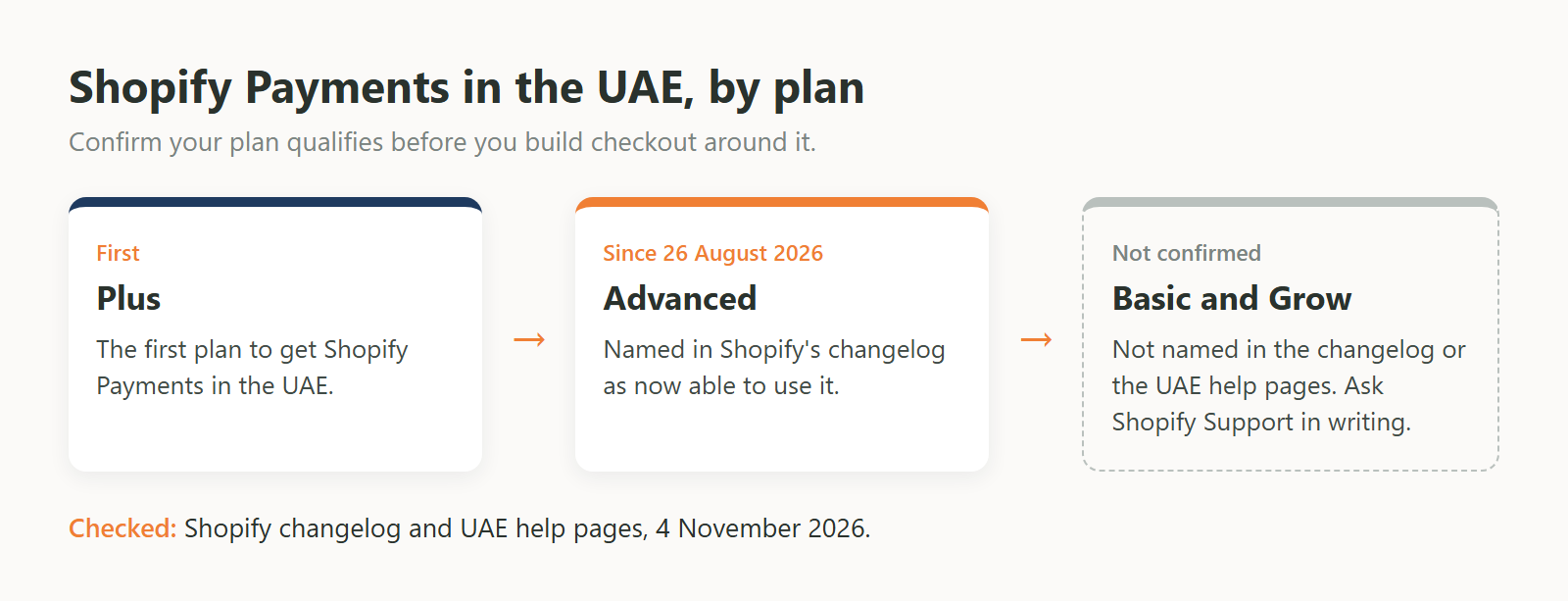
Shopify Payments reached the UAE on Shopify Plus first. Shopify's changelog dated 26 August 2026 says Advanced plan merchants can now use it, and that it was previously available only on Plus. Shopify's UAE help pages do not say which plans can activate it, although the payouts page says AED payouts are available on all subscription plans. We could not find an official statement covering Basic or Grow.
| Plan | Shopify Payments in the UAE | What the source says |
|---|---|---|
| Plus | Yes | The first plan to get it |
| Advanced | Yes, since 26 August 2026 | Named in Shopify's changelog |
| Basic and Grow | Not confirmed | Not named in the changelog or the UAE help pages |
If you plan to start on Basic or Grow, look in Settings, then Payments, on your trial store and ask Shopify Support to confirm in writing before you commit. Some guides online still say Shopify Payments is unavailable or limited for most UAE businesses, so check any advice you read against the changelog above.
Shopify's UAE requirements page sets out the conditions. Prepare these before you apply:
Shopify Payments takes payments online only, through Visa, Mastercard, Maestro, Apple Pay, Google Pay and Shop Pay. In-person sales need a separate terminal and processor. On payouts, the minimum settlement time is 5 business days and starts longer for new stores, and banks can take another 24 to 72 hours. Payments captured from Friday to Sunday arrive as one payout, so keep enough cash to cover suppliers and couriers during that wait.
Shopify supports over 100 card payment providers. You can use one as your only card provider, or alongside Shopify Payments for additional payment methods. Shopify charges a third-party transaction fee on payments through third-party providers, on top of what the provider charges, even when Shopify Payments is active. The rate depends on your plan. Each provider's own documents show details that are easy to miss:
| Provider | How it connects | What to check first |
|---|---|---|
| Tabby | Shopify app, plus live API keys and six webhooks you create in the admin | Needs a signed Tabby contract. Takes UAE and KSA billing addresses only. Email and phone must be required at checkout. Test mode must be off, and Tabby does not pay out on test orders. Customising how it looks at checkout is Plus only. |
| Tamara | The Tamara Split Payments app | Needs a Tamara merchant account first. Test mode is not supported, so leave that box unticked. Shopify's transaction fee appears in Settings, then Payments, after activation. |
| Telr | Two apps: Telr redirects to an external page, TelrOnsite stays on your store and takes cards only | If you use your own domain, Telr asks you to contact its support. Linking a domain to a different Telr store can affect refunds on the earlier store. |
Two of these do not work with a normal test order, so plan a small live purchase and refund for each one before launch. We compare the running costs in our guide to Shopify, WooCommerce and custom stores.
Cash on delivery is a manual payment method. Turn it on in Settings, then Payments, and write the instructions customers see after ordering. These orders show as unpaid until you mark them as paid, so someone has to match courier collections to orders. Shopify does not charge its third-party transaction fee on manual payments. Ask your courier how and when it passes the cash back to you before you offer this at checkout.
VAT registration becomes mandatory when your taxable supplies and imports have passed AED 375,000 in the last 12 months, or you expect them to pass it within 30 days. Under Federal Tax Authority rules, you can also register voluntarily above AED 187,500. The mandatory threshold does not apply to foreign businesses. Once registered, you set the rate in Shopify yourself.
After registration, VAT returns are due by the 28th day after each tax period, which the FTA usually sets at three months. Agree with your accountant which Shopify sales reports they need before you launch.
There are three separate rules. The e-commerce rules ask for a digital invoice on every transaction. VAT rules add tax invoice requirements once you are registered. The e-invoicing programme, which starts in stages in 2026 and 2027, covers sales to businesses and government, and places no obligation on sales to consumers.
| Rule | Applies to | What it asks for |
|---|---|---|
| Digital invoice | Online sellers | A clear digital invoice for every transaction |
| Tax invoice | VAT registrants | Issued and delivered within 14 calendar days of the supply. A simplified tax invoice is allowed if the buyer is not VAT registered, or is registered and the VAT-inclusive price is AED 10,000 or less. |
| Electronic invoice | Businesses selling to other businesses or government, whatever their VAT status. No obligation for a supply to a consumer. | An XML invoice sent through an Accredited Service Provider. With annual revenue below AED 50 million, appoint a provider by 31 March 2027 and go live by 1 July 2027. At AED 50 million or above, the dates are 31 July 2026 and 1 January 2027. |
A simplified tax invoice must show the words "Tax Invoice", your name, address and Tax Registration Number (TRN), the date, a description of the goods, and the total with the VAT amount. Invoice apps on the App Store can produce these, but check a sample against this list with your accountant before you rely on one.
If companies also buy from your store, ask your accountant whether you need a service provider, and how those Shopify orders will reach it. The dates above come from the Ministry of Finance guidelines, version 1.1 of 1 June 2026, so check for a newer version when you plan this work.
Set your rates under Settings, then Shipping and delivery. Shopify offers flat rates, free shipping and carrier-calculated rates, grouped into shipping zones. To sell to a country, it must be in an active market. Flat rates for the UAE are the simplest place to start, because they do not depend on a carrier connection.
If you ship with Aramex, it publishes its own Shopify app for creating shipments, scheduling pickups, printing labels, tracking and showing rates at checkout. The app is free to install, and shipping is billed to your Aramex account. Three things to check first:
Add your return and refund, shipping, privacy and terms of service policies under Settings, then Policies. Shopify can generate automated versions, but it warns that they may not cover everything your business needs. Read each one against what you actually do, and check any delivery times against your courier service before you publish them.
Run through this list with the store still password protected. Shopify's launch guide asks you to place test orders first and to turn test mode off afterwards, so that real payments can come through.
| # | Check | Where |
|---|---|---|
| 1 | The licence covers e-commerce and matches your products, and TDRA approval or NOC is in hand | Licensing authority |
| 2 | Bank account type matches your business type, and the IBAN starts AE | Your bank |
| 3 | Legal name, address and currency match the trade licence | Settings, General |
| 4 | Plan chosen, after confirming Shopify Payments and carrier rates for that plan | Shopify admin |
| 5 | Domain connected, and you hold the registrar login | Settings, Domains |
| 6 | Cash on delivery instructions agreed with your courier | Settings, Payments |
| 7 | VAT rate set if you are registered, and prices include VAT | Settings, Taxes and duties |
| 8 | A sample invoice checked by your accountant | Your invoice app |
| 9 | Shipping rates tested for each zone | Settings, Shipping and delivery |
| 10 | Policies reviewed against what you actually do | Settings, Policies |
| 11 | Test orders placed for each method that supports them, and any VAT on them is correct | Settings, Payments |
| 12 | Test mode turned off, then a small live purchase and refund for Tabby and Tamara | Settings, Payments |
| 13 | Password removed | Online Store, Preferences |
You can launch a straightforward store yourself using the steps above. Bring in a developer when the work goes past the theme editor, such as custom sections, Tabby webhooks and snippets, or stock and orders that must stay matched with your ERP or warehouse software. Moving an existing store to Shopify also needs its own plan.
If you want help, our Shopify development company in Dubai page lists what we build, including payment gateways, store migration and third-party integration. If you have not settled on Shopify yet, start with our e-commerce development page.
Ask Us Anything!
Yes. UAE law regulates the seller, and Shopify is the store platform. You need a licence covering e-commerce and TDRA approval, and you can sell only products allowed in the UAE.
Yes, to sell. Shopify lets you open a store without one, but the UAE government portal says online sellers must obtain the required licences and approvals. Shopify Payments also asks for a company registration number and a trade licence or other UAE permit.
Shopify has confirmed Plus and, since 26 August 2026, Advanced. We could not find an official statement on Basic or Grow, so ask Shopify Support to confirm before you choose those plans.
Your total depends on the plan, your payment route, any paid theme and apps, and shipping. Shopify's third-party fee also changes by plan. Our Shopify, WooCommerce and custom store comparison goes through these costs.
Possibly. The UAE law covers selling through social media as well as websites, and Dubai's E-Trader licence is designed for selling through social media and online platforms. Confirm that your licence activity covers both. The UAE portal also lists a Media Council guide on the permit for advertising content on social media, so check whether your promotions need it.
A free zone company can operate within its free zone and internationally. To sell directly on the mainland, the UAE portal says it may need a local distributor or additional approvals. Ask your free zone authority what applies to your licence before you launch.
We use cookies to help you navigate efficiently and perform certain functions. You will find detailed information about all cookies under each consent category below.
The cookies that are categorised as "Necessary" are stored on your browser as they are essential for enabling the basic functionalities of the site.
We also use third-party cookies that help us analyse how you use this website, store your preferences, and provide the content and advertisements that are relevant to you. These cookies will only be stored in your browser with your prior consent.
You can choose to enable or disable some or all of these cookies but disabling some of them may affect your browsing experience.