How to Design a Multilingual Website for Arabic and English Users in the UAE



A multilingual UAE website is not just a translated copy. Build the Arabic and English versions as equals: right-to-left (RTL) layout for Arabic, proper Arabic fonts, a clean URL structure with reciprocal hreflang, and content that is transcreated rather than machine translated. Get the language and direction attributes right in code, keep both versions at parity, and structure answers so search engines and AI tools can quote you in either language.
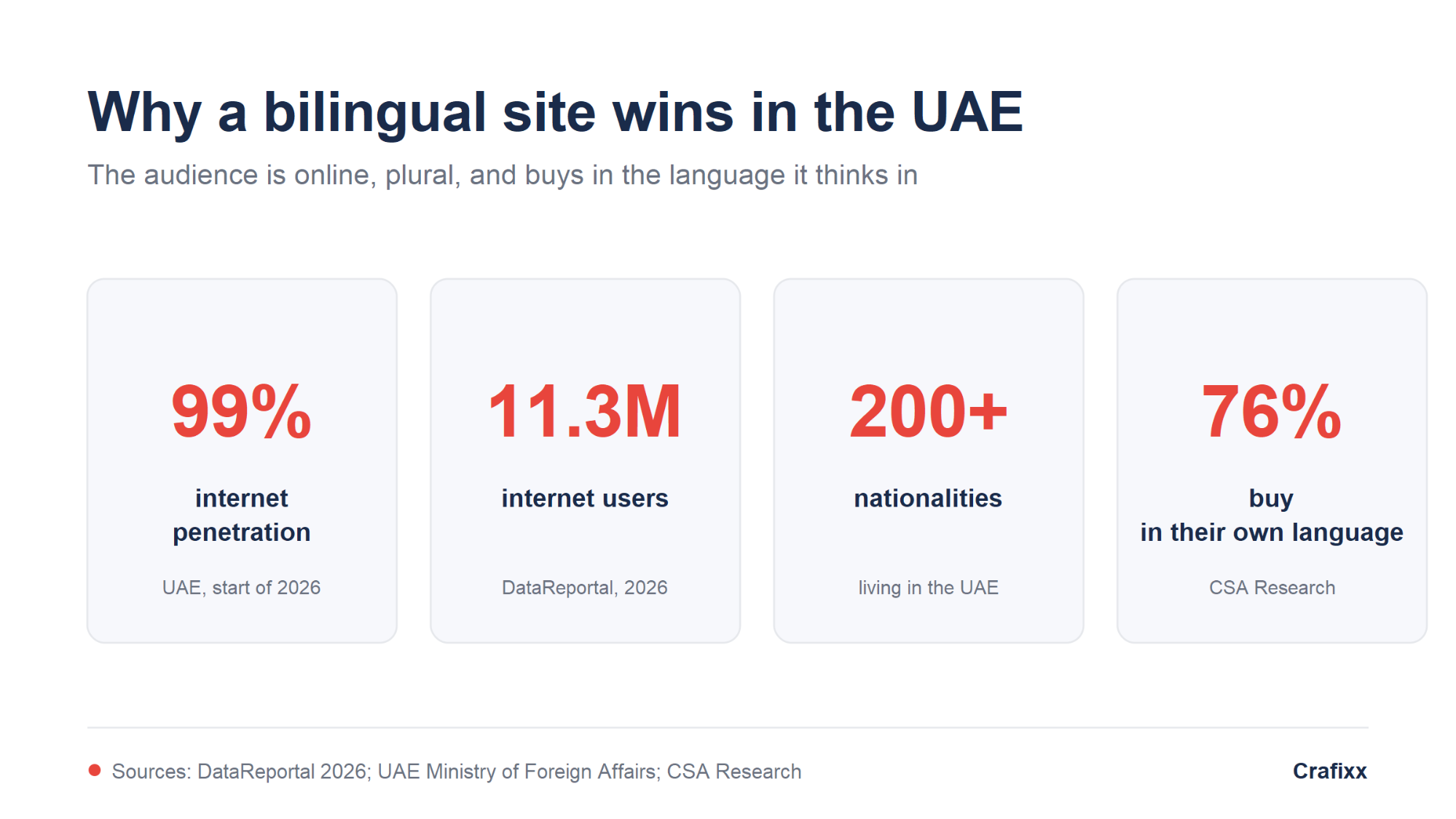
Almost the entire UAE is online. DataReportal put internet penetration at 99.0 percent, with 11.3 million people using the internet at the start of 2026 (DataReportal, 2026). That audience is split across more than 200 nationalities (UAE Ministry of Foreign Affairs), and it does not all read English. A bilingual Arabic and English website is how you reach both the local Arabic-speaking market and the expat majority at the same time.
This guide is the practical version: what a multilingual website actually is, what to translate, how to handle Arabic RTL design and typography, which URL and hreflang setup to use, how to stay compliant with UAE standards, and how to be found in both classic search and AI answers. No jargon for its own sake, and every recommendation is one you can hand to a developer.
A multilingual website serves the same content in more than one language, with each version treated as a full, first-class page rather than an afterthought. In the UAE that almost always means Arabic and English, side by side. It matters because language decides trust: people read, and buy, in the language they think in.
The evidence is blunt. In CSA Research's long-running study of 8,709 consumers across 29 countries, 76 percent said they prefer to buy products with information in their own language, and 40 percent said they will not buy from websites in other languages at all (CSA Research). In a market where Arabic is the official language and English is the lingua franca of business, serving only one of them leaves half the room out of the conversation.
A well-built multilingual website is not a nicety in the UAE. It is how a brand signals that it belongs to both the local and the international market it is trying to serve.
Most UAE businesses need a bilingual (Arabic and English) site, not a full multilingual or multiregional build. Bilingual means two languages. Multilingual means three or more. Multiregional means the same language tuned to different countries. Choosing the wrong one adds cost and complexity you do not need.
| Type | What it means | Best for in the UAE |
| Bilingual | Two languages, usually Arabic and English | Most local businesses, clinics, agencies, retailers |
| Multilingual | Three or more languages (add Hindi, Urdu, Russian, Chinese) | Tourism, real estate, luxury, large e-commerce |
| Multiregional | Same language, different countries (UAE English vs UK English) | GCC or global brands with country-specific offers |
Start bilingual, and design the structure so a third or fourth language can be added later without a rebuild. Adding languages should be a content decision, not an engineering project.
Translation converts words. Localization adapts the whole experience (currency, dates, numerals, imagery, tone) to the local market. Transcreation rewrites the message so it lands with the same intent, not the same words. For Arabic in the UAE, machine translation alone is the fastest way to look foreign and lose trust.
| Approach | What it changes | Use it for |
| Translation | The literal words | Legal text, specs, documentation |
| Localization | Currency (AED), dates, numerals, images, tone | Product pages, checkout, forms, UI |
| Transcreation | The message and emotion, kept on-brand | Headlines, campaigns, hero copy, CTAs |
A practical rule: transcreate what sells, localize what functions, and translate what is legal or technical. A native Arabic writer or editor should always review the Arabic version before it goes live.
Everything a user or a search engine can see should exist in both languages, at parity. That means visible content, navigation, buttons and forms, error messages, and the invisible layer: page titles, meta descriptions, image alt text, and structured data. A half-translated site confuses people and search engines alike.
Content parity is the goal. Google's own guidance is to give each language version its own clear URL and to make the language of every page obvious, rather than mixing languages on one page or swapping text with cookies (Google Search Central). Build a simple checklist and hold both versions to it:
If a section only exists in English, decide deliberately whether to translate it or hide it in the Arabic version. Never leave a blank or an English fragment stranded in an Arabic page.
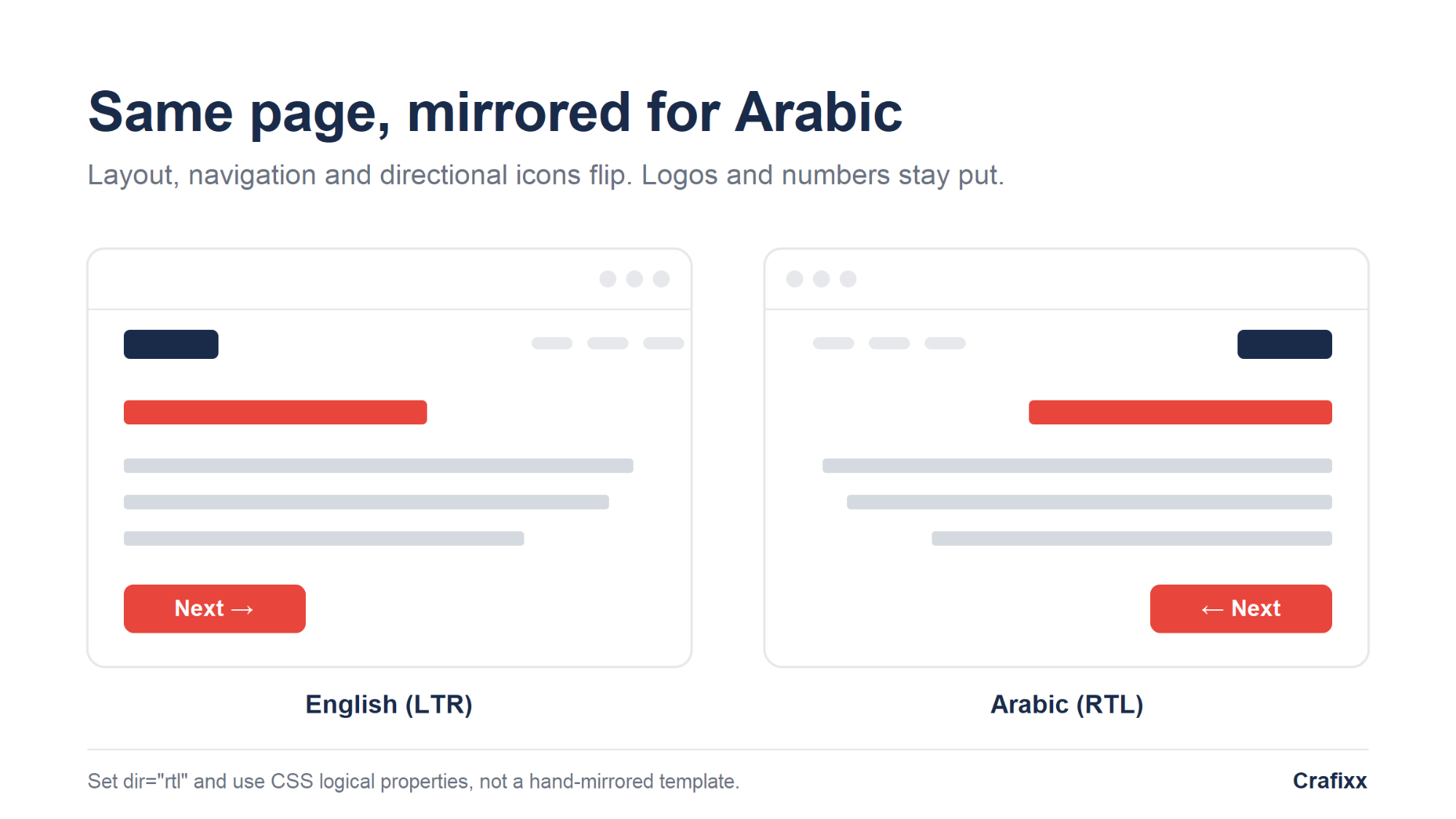
Arabic reads right to left, so the Arabic version needs a mirrored (RTL) layout, not just Arabic text poured into a left-to-right template. Set dir="rtl" on the Arabic pages and let layout, navigation and reading order flip. Some elements mirror; others, like phone numbers and logos, stay put.
| Element | In RTL (Arabic) |
| Text and reading flow | Right to left, right-aligned |
| Navigation and layout | Mirrored: menu, sidebars and columns flip |
| Directional icons and arrows | Flip (a "next" arrow now points left) |
| Sliders, carousels, progress bars | Reverse direction |
| Numbers, phone numbers, code, brand logos | Stay left to right, do not mirror |
The clean way to build this is with CSS logical properties (margin-inline, padding-inline, inset-inline) instead of hard-coded left and right values, so one stylesheet serves both directions. This is core to any modern responsive web design build in a bilingual market.
Accessibility is not optional in the UAE, and it starts with two attributes. Every page must declare its language and direction in code: <html lang="ar" dir="rtl"> for Arabic and <html lang="en" dir="ltr"> for English. That single line tells browsers, screen readers and AI crawlers which language they are reading.
The benchmark is WCAG, the Web Content Accessibility Guidelines published by the W3C's Web Accessibility Initiative (W3C WAI). UAE federal government websites are held to WCAG 2.1 / 2.2 Level AA, framed around accessibility for "people of determination," the UAE's term for people with disabilities (u.ae, UAE Government). Private sites are not legally bound the same way, but matching that bar is the safest, most inclusive standard to build to. Practical must-haves: a clearly visible language switcher, correct lang and dir on every page, sufficient colour contrast, keyboard navigation that respects RTL, and screen-reader-friendly labels in both languages.
Arabic is a connected, cursive script, so a font built for Latin letters will look broken. Choose a proper Arabic web font, give Arabic more line height than English, and never fake bold or italics on Arabic text. Good type is the difference between a page that feels native and one that feels auto-translated.
Reliable, well-supported Arabic web fonts include:
Two details people miss: numerals and encoding. Decide whether to show Western digits (123) or Arabic-Indic digits, and stay consistent. And make sure the whole stack is UTF-8 so Arabic characters render everywhere, in the browser, in emails and in your database.
Pick a platform that gives every language its own indexable URL and that has genuine right-to-left support in the front end. Those two things decide whether your Arabic site works. Everything else, the plugin, the app, the framework, is a preference. The most expensive mistake in a bilingual build is assuming the platform handles Arabic because it says it handles languages.
Those are two separate jobs, and almost nobody separates them. Routing is the platform's job: giving Arabic its own URL, its own content record, its own lang and dir values. Mirroring is the front end's job: flipping the layout so menus, columns, icons and form fields read right to left. A platform can do the first perfectly and still leave you with Arabic text sitting inside a left-to-right template.
| Platform | How Arabic is stored | URL per language | hreflang | RTL reality |
| WordPress with Polylang or WPML | Separate posts and pages per language | Yes, /ar/ subdirectory | Emitted by the plugin | Depends entirely on your theme |
| Shopify | Translations attached to the store's content | Yes, /ar path or subdomain | Added automatically | Depends on your theme |
| Webflow | Locale-level overrides of one design | Yes, /ar locale subdirectory | Auto-generated | Applied automatically for Arabic |
| Custom or headless build | However your developer designs it | Yes, if the developer routes it | Only if the developer writes it | Whatever your front end does |
WordPress needs a multilingual plugin, and Polylang or WPML are the two worth considering. Both store Arabic as genuinely separate content with its own URL, and both emit hreflang for you. Neither fixes your theme. Install either on a theme with no right-to-left stylesheet and you get Arabic words in an English layout, with the plugin reporting success. Choose the theme before the plugin, and view a real page in Arabic rather than a vendor demo.
Shopify publishes up to 20 languages from one store on every plan except Lite, changes your store URLs to a language path, and adds hreflang tags and sitemap entries automatically (Shopify Help Center). Two caveats matter for Arabic. Shopify's own guidance is to check that your theme supports right-to-left languages, and the Translate & Adapt app is explicit that translations are not generated for you. You supply the Arabic.
Webflow is the one platform that solves the mirroring problem for you. It applies right-to-left script automatically on published sites for Arabic, Persian, Hebrew, Urdu and Yiddish locales, even when the text has not been localized yet, and you can override it per element. That is a real advantage for a bilingual UAE build. It comes with a catch, covered below.
Custom and headless builds give you the most control and the least done for you. Next.js routes locales through a dynamic segment such as app/[lang], by sub-path or by domain, and the framework documents the pattern rather than shipping it finished. Laravel stores translation strings in a lang directory and sets the locale at runtime (Laravel documentation), which covers your interface text and nothing else. On a custom stack the language URLs, the reciprocal hreflang, the right-to-left stylesheet and the language switcher are all line items on a scope of work. Price them, or you will get an English site that renders Arabic characters.
Two rules cover most of it, and they are the same on every platform. Set the base direction in markup, not in CSS. The W3C is direct on this: do not use CSS to apply base direction in HTML pages, because direction affects the meaning of your content and has to survive even when styles do not. Then write your layout with CSS logical properties such as margin-inline-start and padding-inline-end instead of hard-coded left and right, so a single stylesheet serves both directions and flips itself.
Google advises against automatically redirecting users to a different language version based on perceived language, because it stops both users and crawlers reaching every version of your site. Offer a visible switcher instead, or a dismissible banner, and let the reader choose.
This is worth checking on your platform rather than assuming, because at least one popular option does it by default. Webflow's locale routing sends visitors to a locale based on browser preference, and Webflow states plainly that the feature uses 302 redirects and there is not a native way to override this behavior. If that is your stack, know that it is happening. The pattern that works everywhere is a persistent switcher in the header, labelled in the language it switches to, so the Arabic option reads in Arabic.
Everything content-shaped. Pages, products, menus, form labels, image alt text, meta titles and meta descriptions all need an Arabic counterpart, and your cache holds a separate copy of every page per language. The licence or the plan is the small number. The recurring cost is that every future page and campaign is now two pieces of work, and someone has to own the Arabic half.
Bilingual sites fail because the Arabic side stopped being updated six months after launch, not because the software broke. Decide before you build who writes the Arabic, how new pages get queued for translation, and what happens when a price or a phone number changes. If there is no answer to the third question, you will eventually publish two different phone numbers.
Question four separates a bilingual site from a translation overlay. If the answer is that it vanishes, you do not have an Arabic website. You have an English website wearing Arabic.
You do not usually rebuild. Confirm the front end supports right to left and fix it if it does not, set the language URL format, then translate page by page, starting with the pages that already earn impressions. Publish Arabic pages as they are genuinely ready. A thin set of half-empty Arabic duplicates is worse than not having them yet.
The one thing that does force a rebuild is a front end with no right-to-left path at all, which is a design and development problem rather than a content one. Our teams for web design and web development scope the template, the language routing and the translation workflow as one decision, because taken separately they usually produce the mismatch described above.
Give each language its own clear, permanent URL. The three standard options are a subdirectory (example.ae/ar/), a subdomain (ar.example.ae), or a separate country domain (example.ae). For most UAE businesses on a single brand, a subdirectory is the strongest default: it is simple, keeps authority on one domain, and is easy to maintain.
| Structure | Example | Advantages | Limitations | UAE recommendation |
| Subdirectory | example.ae/ar/ | Simple, one domain, shared authority | Less separation between versions | Strongest default for most sites |
| Subdomain | ar.example.ae | Cleaner separation of teams and content | More infrastructure, authority can split | Situational, for larger orgs |
| Separate ccTLD | example.ae | Strong country signal for the UAE | Separate domain to build and maintain | Useful for UAE-specific brands |
Whichever you pick, keep it consistent and permanent. Google supports all three and asks only that each version has its own URL it can crawl and index (Google Search Central). Do not swap languages on the same URL using cookies or the browser's language setting; search engines cannot reliably index that.
hreflang is the tag that tells search engines which page is which language, so the right version shows to the right user. Add reciprocal hreflang annotations linking your Arabic and English pages to each other, plus an x-default for a neutral fallback. Getting this wrong is the single most common multilingual SEO mistake.
One nuance worth getting right: you do not have to use region codes just because the audience is in the UAE. Use ar and en when you are targeting by language only, and ar-AE and en-AE only when you are specifically targeting the UAE region and may have other regional versions later. For a single UAE bilingual site, language-only codes are usually enough.
| Page | hreflang value | Purpose |
| English version | en or en-AE | English, or UAE English |
| Arabic version | ar or ar-AE | Arabic, or UAE Arabic |
| Neutral fallback | x-default | Language selector or default page |
Every page must reference itself and its counterpart. If the English page points to the Arabic page but the Arabic page does not point back, search engines ignore the whole set. Validate the tags after launch, then again after any migration.
Two language versions are two chances to rank, but only if each is treated as a real page. Do keyword research natively in Arabic (not by translating English keywords), keep both versions in your XML sitemap, and register the site in Google Search Console to watch both. Consistent business details across languages tie the whole thing together.
A short checklist that covers most of the wins:
This is standard SEO, applied twice. The Arabic side is often less competitive, which is exactly why it is worth doing properly.
AI tools like ChatGPT, Gemini and Perplexity increasingly answer questions directly, and they can quote your Arabic or English content if it is structured to be quoted. The goal is not a trick; it is citation-ready architecture: clear answers, clean structure, and strong signals of who you are, in both languages.
What makes a bilingual page easy to cite:
A caution worth stating plainly: no word count, schema type or keyword density guarantees a citation. Structure and trust make you quotable; they do not force it. For a deeper walkthrough of this, see our guide on getting cited by AI chatbots and our work in AI SEO.
The UAE has an official reference for how a bilingual site should behave: the UAE Design System, maintained by the Telecommunications and Digital Government Regulatory Authority (TDRA) for federal government websites. It requires Arabic and English delivery, full RTL support, properly declared language attributes, and WCAG-level accessibility.
You are not legally bound by it unless you are a government entity, but it is the clearest local benchmark you have (TDRA, UAE Design System). Building a private site to the same principles, bilingual by default, RTL done properly, declared languages, and AA accessibility, is a shortcut to a site that feels genuinely local and trustworthy rather than translated.
You can build a solid bilingual UAE site by working through these steps in order. Each one depends on the one before it, so do not skip ahead to design before the content plan is set.
Bilingual bugs hide in the details, so test the Arabic version's UX as carefully as the English one. Walk through every template in Arabic on a real phone, not just a desktop preview. Most problems show up in forms, mixed-language strings and mobile layouts, not in the body text everyone checks first.
Most guides stop at launch, but a bilingual site drifts if you let it. Every time you add or edit an English page, the Arabic version needs the same change, with its own hreflang and metadata. Build a simple workflow so parity is maintained by default, not remembered by accident.
Most bilingual failures are avoidable and repeat across sites. Knowing them upfront saves a rebuild later.
Ask Us Anything!
One bilingual site is almost always better. Keep both languages on the same domain, usually with a subdirectory like /ar/ and /en/, so authority and maintenance stay in one place. A separate Arabic domain only makes sense for a distinct brand or a very different market.
No. Auto-translation is fine for a rough draft, but Arabic needs a native writer or editor to sound natural and trustworthy. Machine-translated Arabic is one of the fastest ways to look foreign to a UAE audience and lose the sale.
RTL means right-to-left, the direction Arabic reads. An RTL layout mirrors the page: text right-aligns, navigation and columns flip, and directional icons reverse. Numbers, code and logos stay left to right. You set it with dir="rtl" and CSS logical properties.
Use ar and en if you are targeting by language only, which suits most single UAE sites. Use ar-AE and en-AE only if you are specifically targeting the UAE region and may add other regional versions later. Always add reciprocal tags and an x-default.
Use a font designed for Arabic, such as Dubai Font, Noto Sans Arabic, IBM Plex Sans Arabic, Cairo or Tajawal. Give Arabic more line height than English, keep the whole stack UTF-8, and never fake bold or italics on Arabic text.
Yes. Each language version is a separate chance to rank, and the Arabic side is often less competitive. Research Arabic keywords natively, give each version its own URL and metadata, add hreflang, and submit both to Search Console.
It depends on scope: number of pages, platform, and whether content is transcreated or lightly translated. The biggest cost driver is quality Arabic content, not the build. The right approach is a fixed scope and a quote against it, rather than a generic price.
The one that gives each language its own indexable URL and whose front end genuinely mirrors for right to left. WordPress with Polylang or WPML, Shopify, Webflow and a custom build all clear the first bar. Only Webflow clears the second on its own. On every other platform, right-to-left support is a property of your theme, not of the platform.
Usually not. Shopify tells you to check that your theme supports right-to-left languages, and a WordPress multilingual plugin will not fix a theme that lacks a right-to-left stylesheet. Webflow is the exception and applies right-to-left script automatically for Arabic locales. Test a real page in Arabic before you commit to a template.
Often yes. If your platform supports a language subdirectory and your front end can mirror for right to left, you add the language layer, set the URL format, and translate page by page, starting with pages that already earn impressions. A rebuild is only forced when the front end has no right-to-left path at all.
On /ar/ for almost every UAE business. A subdirectory keeps authority on one domain and needs no DNS work. Subdomains and separate domains are for genuinely separate markets or brands. Avoid the language parameter format, which Google lists as not recommended for multi-regional and multilingual sites.
We use cookies to help you navigate efficiently and perform certain functions. You will find detailed information about all cookies under each consent category below.
The cookies that are categorised as "Necessary" are stored on your browser as they are essential for enabling the basic functionalities of the site.
We also use third-party cookies that help us analyse how you use this website, store your preferences, and provide the content and advertisements that are relevant to you. These cookies will only be stored in your browser with your prior consent.
You can choose to enable or disable some or all of these cookies but disabling some of them may affect your browsing experience.