How to Integrate WhatsApp Into a Business Website: Forms, Chat and CRM



Start with a wa.me click to chat link (your number with the country code) on the pages where people decide to contact you. If one person answers, the WhatsApp Business app is enough. If a team answers and every lead needs an owner, connect the number to your CRM through the WhatsApp Business Platform (Cloud API). Whichever you choose, track each WhatsApp click in GA4 as a lead action.
In this guide:

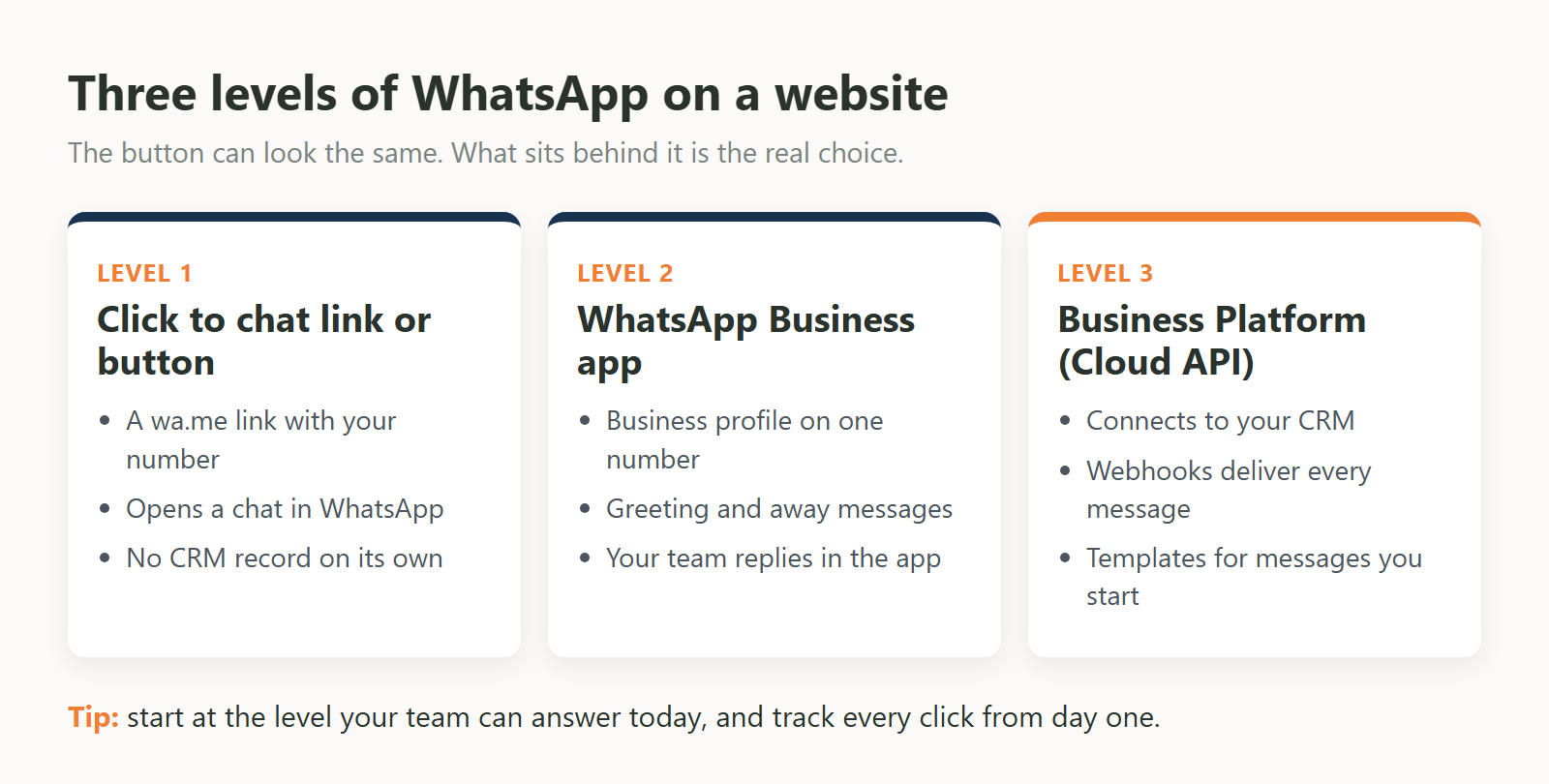
There are two layers to decide. On the website, you choose how visitors reach you: a wa.me link, a branded button or widget, or a form that hands over to WhatsApp. Behind the website, you choose where the chat lands: the WhatsApp Business app on one number, or the WhatsApp Business Platform connected to your CRM.
Much of the confusion comes from mixing the two layers. A green floating button can open a chat on the owner's phone, or it can start a conversation that is logged against a lead record, assigned to a salesperson and counted in your reports. Visitors see the same button. Your team gets a very different setup.
Click to chat is an ordinary web link that opens a WhatsApp conversation with your number. The format comes from WhatsApp's own help page: https://wa.me/ plus the complete number written the international way, without zeroes, brackets or dashes. It works on phones and on WhatsApp Web.
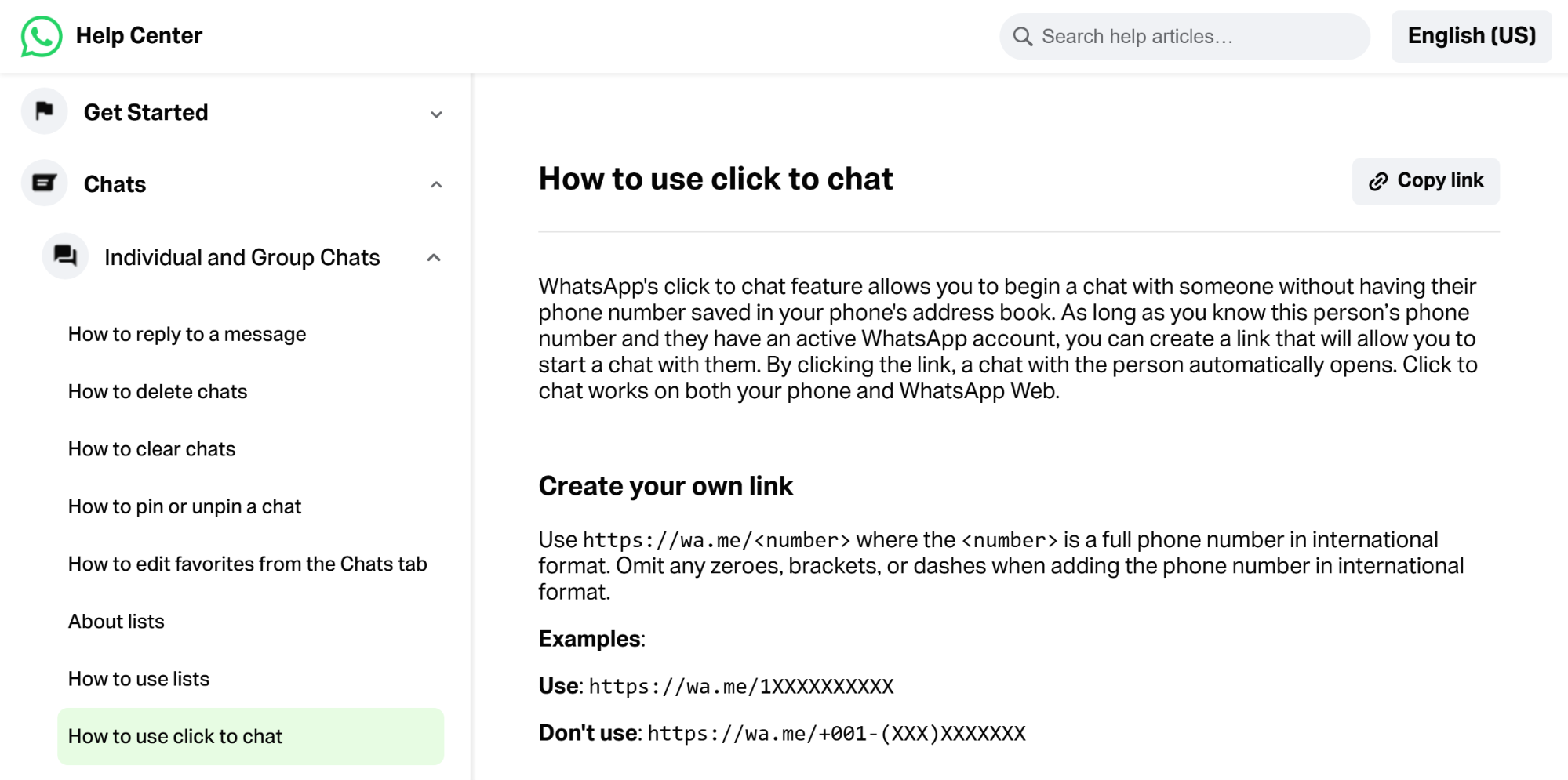
For a UAE mobile number, that means the country code 971 followed by the number without its leading 0. A link to a number written locally as 05X XXX XXXX becomes:
| https://wa.me/9715XXXXXXXX |
You can also add a pre-filled message. WhatsApp says the text appears automatically in the chat's text field, as long as it is URL-encoded (a space becomes %20). This is more useful than it looks. Write a different message for each service page, and your team can see which page the chat came from before they reply:
| <a href="https://wa.me/9715XXXXXXXX?text=Hi%2C%20I%20have%20a%20question%20about%20kitchen%20renovation" aria-label="Chat on WhatsApp">Chat on WhatsApp</a> |
Two checks before you publish: open the link on a phone that does not have your number saved, and confirm the number has an active WhatsApp account. The help page notes that the person you are linking to must have one, so a number without WhatsApp will not open a chat.
A chat button or widget is the visible part of a WhatsApp link: an icon, a branded button or a small chat box that floats on every page. It makes WhatsApp easier to find, especially on mobile. It does not change what happens after the tap unless the tool behind it is connected to the WhatsApp Business Platform.
WhatsApp offers its own branded Chat on WhatsApp button in green or white and in small, medium and large sizes. Its usage guidance is short: use the button as it is, without changing it, keep it visible and easy to read, and use the latest version. WhatsApp lists contact pages, landing pages and the mobile version of your site among the places to use it. The button is currently available in English only. In code, it is simply an image inside the same wa.me link shown above.
Third-party widgets can add extras, such as a greeting bubble or a choice of team members to message. Before you install one, check three things:
One small search trap: the WhatsApp Help Center article about widgets is about adding a WhatsApp widget to your phone's home screen, not to a website. Website widgets come from plugins, your CRM or your developer.
The WhatsApp Business app is a standalone app for one-to-one conversations, run by the owner or a small team. The WhatsApp Business Platform is a set of APIs, including the Cloud API, that connects your WhatsApp number to software such as a CRM, a shared inbox or your own system. Your website can link to either.
WhatsApp describes the Business app as "built with the small business owner in mind". You get a business profile, a way to show your products and services, and messages that greet people when they start a chat or reply when you are away. Conversations stay one-to-one, answered in the app.
The Platform is described as enterprise-level WhatsApp APIs. Its customer care use cases include routing a chat to a live agent only when needed, and integrating with back-end systems like CRM and marketing automation platforms. Other listed uses are order confirmations, shipment updates and appointment reminders, plus automated flows and interactive messages with buttons, product lists and rich media. Those automated flows are the building blocks of a WhatsApp chatbot: a guided conversation that answers common questions and hands over to a person when needed. Meta's developer documentation lists the Cloud API for sending and receiving messages from your business phone number, and the Business Management API for managing accounts and templates. When people say "WhatsApp Business API", this is the platform they mean.
WhatsApp gives two ways to set up the Platform:
Three rules of the Platform shape how a website integration works:
You do not always have to choose one or the other for ever. Meta's overview says businesses can use the Business app and the API with the same phone number, and its getting started guide explains how existing app users can connect their number to the Cloud API. Check your CRM's own rules first, though: Zoho CRM's help page says only unused phone numbers can be used for its integration.
The right method depends on who replies, whether leads need to be recorded and how much you want to measure. A link is the simplest to set up but keeps no record of the conversation. The Business app suits one person replying. The Platform, through a partner, a CRM or your own build, suits teams that need ownership, history and reporting.
| Method | Setup | Who replies | CRM sync | Tracking | When it fits |
|---|---|---|---|---|---|
| Click to chat link (wa.me) | One link: wa.me, your full international number and optional pre-filled text | Whoever has WhatsApp open on that number | None on its own | GA4 records an outbound click automatically when enhanced measurement is on | Small team, a few chats, testing demand |
| Chat on WhatsApp button or widget | Official button image in the same link, or a plugin or script | Same as the link, unless the tool is connected to the Platform | Only if the tool is connected to the Platform | Outbound click if it is a normal link; otherwise test in DebugView and add a custom event | You want WhatsApp visible on every page, especially on mobile |
| WhatsApp Business app | Install the app, set up the business profile, greeting and away messages | The owner or team, inside the app | Not by itself; the same number can also be connected to the API | Website clicks in GA4 only | Owner-led business with one-to-one conversations |
| Business Platform through a partner or CRM | Embedded signup through a partner or the CRM's own integration, little or no code | Several people in a shared inbox or CRM messages view | Yes, conversations sit on the lead or contact record | Website clicks in GA4, plus lead stages in the CRM | A sales team where every lead needs an owner |
| Business Platform direct (Cloud API) | Meta app, business portfolio, webhook endpoint and a permanent access token; needs developers | Your own inbox or system, built to your rules | Whatever you build, through webhooks and the API | Events from the website, the server and the CRM | Custom workflows, your own CRM, or several systems to connect |
A form and WhatsApp can work together in three ways: the form saves the lead and alerts your sales team on WhatsApp, the form sends the customer a WhatsApp confirmation, or the form opens WhatsApp with the visitor's answers already typed. The first two need the Platform. The third needs only a link.
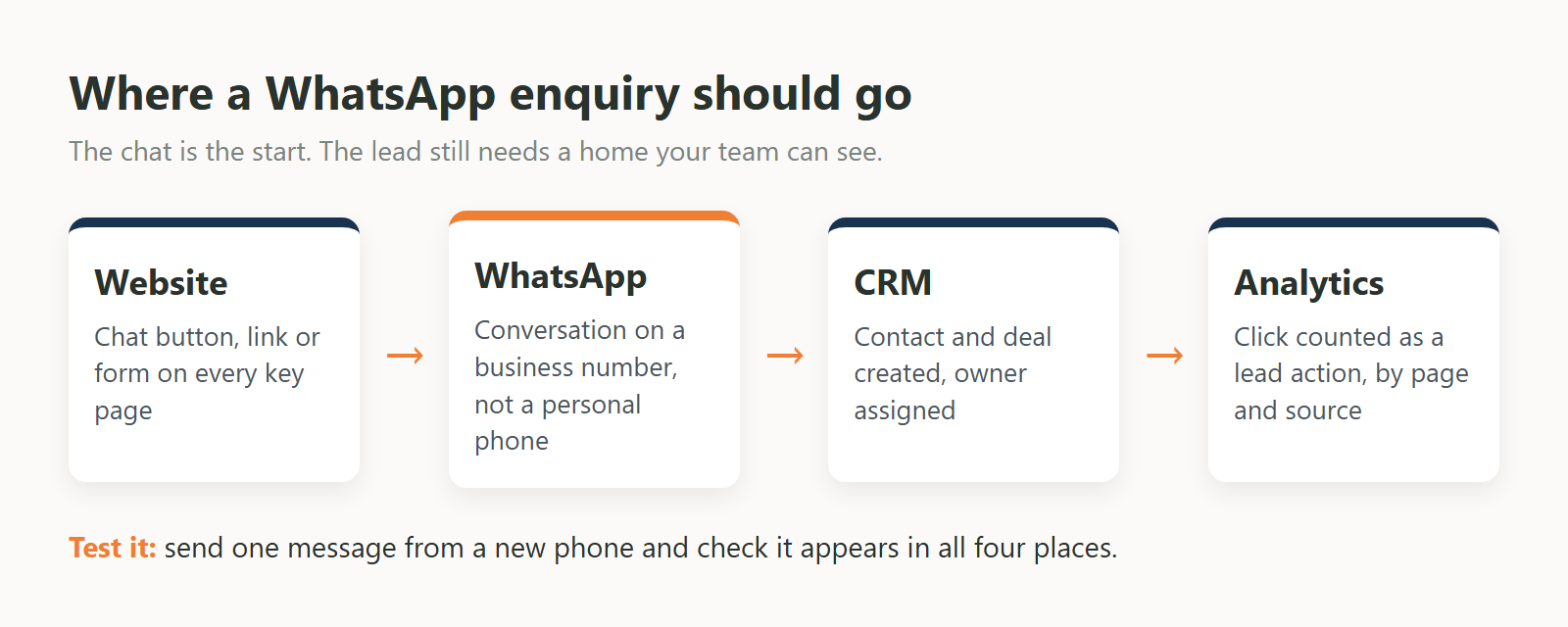
A WhatsApp CRM integration runs through the WhatsApp Business Platform, using either the CRM's built-in connector or a custom build on the Cloud API and webhooks. Once connected, each chat lands in a team inbox, attached to a lead or contact, assigned to a person and kept with its full history.
The built-in route is the quickest to explain. In Zoho CRM, an administrator starts the integration, and you need a Facebook Business Manager account, a verified business, a WhatsApp Business account and a registered phone number. During setup you choose whether new chats are added as Leads or Contacts and which users, groups or roles they are assigned to. Zoho also notes that once your business is verified, it is reviewed for compliance with the WhatsApp Terms of Service and Commerce Policy, so leave room in the plan for business verification. Messages you start from Zoho use approved templates in two categories: Utility, such as an order confirmation, and Marketing, such as a welcome text or a follow-up survey. HubSpot puts WhatsApp conversations in its shared inbox, keeps the conversation history for every customer, and lets your team reply in HubSpot or in the WhatsApp Business app on the same number, with conversations syncing automatically.

The custom route makes sense when your CRM has no WhatsApp integration, or when chats need to reach more than one system. Meta's documentation explains that the platform relies heavily on webhooks: every incoming message is delivered to your server as a webhook, and your code decides what to create, update or alert. This is API integration work: connecting the website, WhatsApp and the CRM so data moves without anyone copying it across by hand.
GA4 can count WhatsApp clicks without extra code. With enhanced measurement on, a click on a wa.me link is recorded as an outbound "click" event with the link URL and domain. For cleaner reporting, also send the recommended generate_lead event on each WhatsApp click, mark it as a key event, and confirm it in DebugView.
Google's enhanced measurement records an outbound click each time a user clicks a link that leads away from the current domain, with parameters such as link_domain and link_url. A wa.me link qualifies, so you can filter clicks where the link domain is wa.me. The same feature records form_start and form_submit for forms.
Outbound clicks mix WhatsApp with every other external link, so add a clear lead event as well. Google's list of recommended events includes generate_lead, triggered when a user "submits a form or a request for information". A WhatsApp click is a request for information, so send generate_lead with a parameter that says which method was used, for example whatsapp, form or call. Then:
A click shows intent; it does not prove a conversation happened. The rest of the funnel lives in your CRM. Google's lead generation events, qualify_lead, working_lead and close_convert_lead, are suited to conversions that happen offline, and sending them fills the Lead acquisition report. Connecting those CRM stages back to GA4 is part of how we set up GA4 tracking for every lead action, so WhatsApp clicks sit next to form submissions and calls in the same reports.
On the WhatsApp side, the Platform keeps its own numbers. Meta lists account analytics in the Business Management API, including how many messages were sent and delivered and how often template buttons were clicked. Use them to check message delivery, and keep GA4 and your CRM as the record of where leads came from.
Choose by how many people reply and what you need to record. If one person replies and you only need to know that chats are coming in, a wa.me link plus the Business app is enough. If several people reply and every enquiry needs an owner and a history, connect the number to your CRM through the Platform.
Use this checklist:
WhatsApp works best on a website when it is planned with the forms, the CRM and the tracking, not added as a plugin at the end. On our web development projects, integrations such as CRM, WhatsApp Business API and booking systems are configured and tested before handover.
Whichever level you start at, send a test chat from a new phone and check it reaches every place it should: the right person, the CRM record and the GA4 report.
Ask Us Anything!
Add a link in the format https://wa.me/ plus the complete number with its country code, leaving out zeroes, brackets and dashes. Put it on a button or text link on your contact page and service pages. You can add a pre-filled message so the chat starts with context.
The Cloud API is part of the WhatsApp Business Platform, the official name for what is often called the WhatsApp Business API or WhatsApp API. It lets software send and receive WhatsApp messages from your business phone number, which is how CRMs and custom systems connect to WhatsApp.
No. A button only needs a wa.me link. You need the WhatsApp Business Platform when chats must reach a CRM or shared inbox, when several people reply from one number, or when your system needs to send messages such as alerts or confirmations.
Meta's documentation says the WhatsApp Business app and the API can be used with the same phone number, and existing app users can connect their number to the Cloud API. Some CRM integrations have their own rules, so check your CRM's help pages before you connect.
Yes, through the WhatsApp Business Platform. Messages your business starts are sent as approved templates, and Meta requires the customer's opt-in first. Add a clear opt-in to the form that names your business and says what you will send.
With enhanced measurement on, GA4 records clicks on wa.me links as outbound click events. For clearer reporting, send the recommended generate_lead event on each WhatsApp click, mark it as a key event and check it in DebugView.
We use cookies to help you navigate efficiently and perform certain functions. You will find detailed information about all cookies under each consent category below.
The cookies that are categorised as "Necessary" are stored on your browser as they are essential for enabling the basic functionalities of the site.
We also use third-party cookies that help us analyse how you use this website, store your preferences, and provide the content and advertisements that are relevant to you. These cookies will only be stored in your browser with your prior consent.
You can choose to enable or disable some or all of these cookies but disabling some of them may affect your browsing experience.